Monthly Usage Growth
The Monthly Usage Growth report compares usage between two different months.
A screen capture of the Monthly Usage Growth report is shown here.
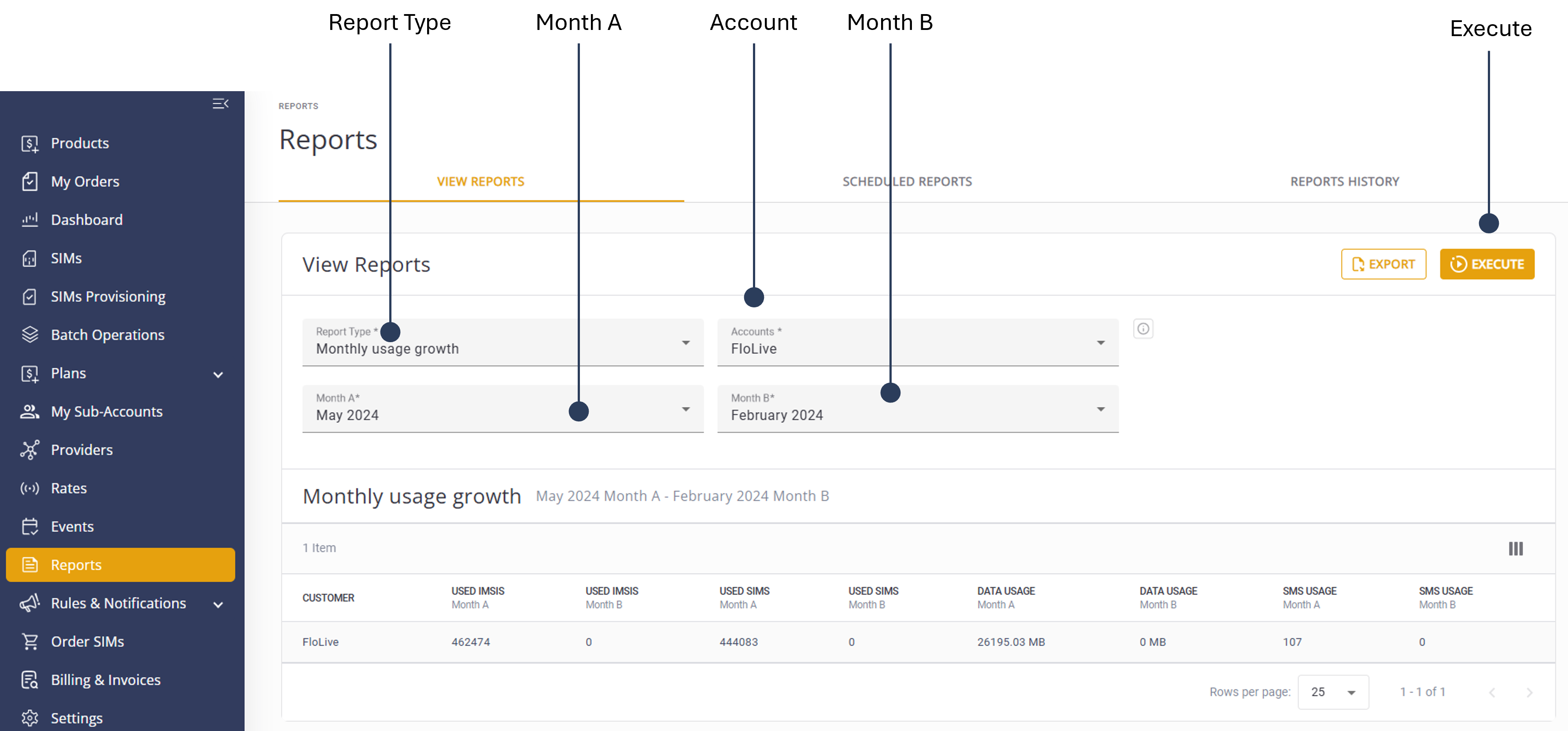
To generate a Monthly Usage Growth report, do these steps:
- Select Reports from the sidebar Menu.
- Select the View Reports tab.
- Report Typeand select Monthly Usage Growth from the list.
- Select one or more Accounts to include in the report.
- Month A and select a start date.
- Month B and select an end date.
- Click Execute to generate the report.
- Click Export to download the report in .csv format.
TIP: To edit the report, modify the report filters and click Execute again.
NOTE: When you select the month, the report displays month-to-date data, that is, from the first day of the month to the current date (the day you generate the report).
A description of the report parameters is provided in this table.
| Attribute | Description |
|---|---|
| Customer | The account holding the Active SIMs and IMSIs |
| Used IMSIs Month A | Total number of Used IMSIs in the Customer Account in Month A (the end comparison month) |
| Used IMSIs Month B | Total number of Used IMSIs in the Customer Account in Month B (the start comparison month) |
| Used SIMs Month A | Total number of Used SIMs in the Customer Account in Month A |
| Used SIMs Month B | Total number of Used SIMs in the Customer Account in Month B |
| Data Usage Month A | Total Data usage volume used by the Customer Account in Month A |
| Data Usage Month B | Total Data usage volume used by the Customer Account in Month B |
| SMS Usage Month A | Total SMS volume used by the Customer Account in Month A |
| SMS Usage Month B | Total SMS volume used by the Customer Account in Month B |